Toll Calculator GPS Navigation
InfoTalk LLCMaps & Navigation
4.0235.00 Reviews
- Version
- 5.5
- Installs
- 100.00K
- Age Rating
- Everyone
Screenshots
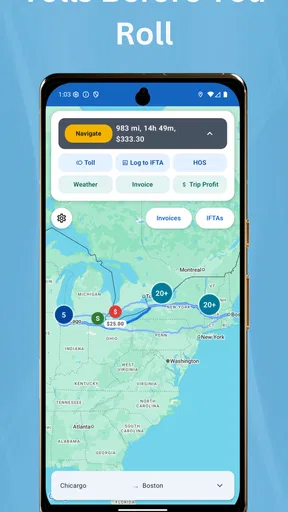
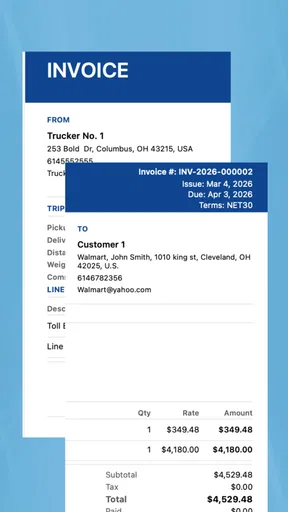
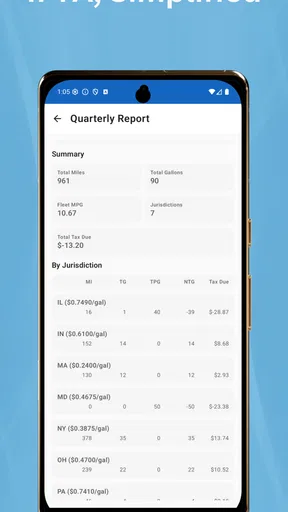
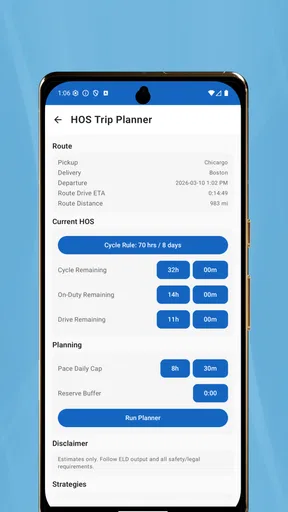
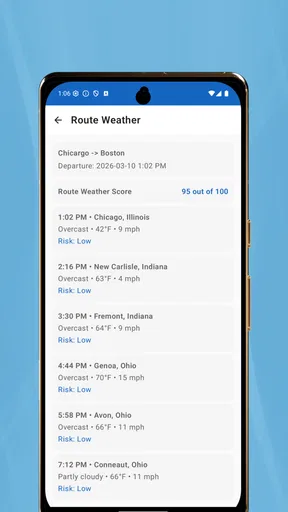
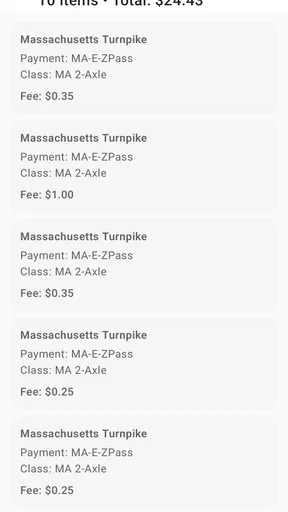
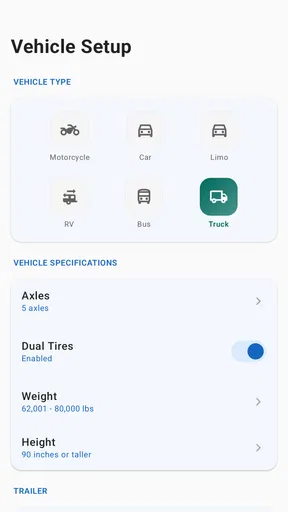
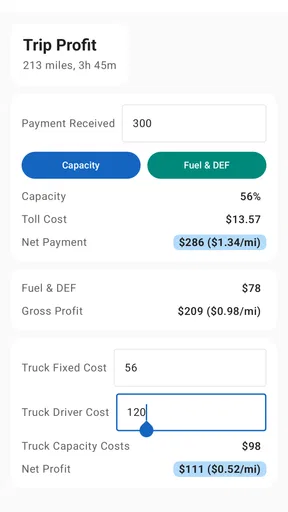
Our Review of Toll Calculator GPS Navigation
 Analysis by Appyee
I first looked at Toll Calculator GPS Navigation because toll roads are one of those travel costs that can quietly change an otherwise sensible route. A navigation app may get me from one place to another, but it does not always make the financial side of that trip easy to understand. This app takes a narrower approach: it is built for estimating toll-related travel costs, with the store description also pointing toward use cases involving cars, RVs, semis, E-ZPass, SunPass, FasTrak, TxTag, and invoice work.
That focus makes it different from a general map application. I would not install it as my only navigation tool, but I can see its value before a long drive, while planning a commercial route, or when checking whether a toll road is worth the time saved. It is a free Maps & Navigation app from InfoTalk LLC, rated for Everyone, and it has passed the 100K+ installs mark. Its average rating is 4.0 from around 790 ratings, which feels consistent with my impression: useful for a specific job, but not a complete replacement for a full navigation suite.
From a vague toll concern to a usable estimate
The most realistic starting point is not “I need another map.” It is usually something more practical: I am planning a trip, I know tolls may be involved, and I want a better idea of what the route will cost before I commit. That could be a family driving an RV, a driver comparing two interstate routes, or a fleet office trying to understand why several invoices do not match expectations.
In that situation, the app’s value comes from separating the toll question from the broader navigation question. I can think about the route, vehicle type, and payment arrangement without asking a general-purpose map to explain every charge at the same time. That separation is helpful because the cheapest route is not always the fastest, and the fastest route is not always the cheapest once tolls are included.
I would begin by deciding what outcome I actually need. If I only want turn-by-turn directions, this is probably the wrong first choice. If I want to compare toll exposure, estimate a trip budget, or prepare for a toll-related conversation, it becomes much more relevant. That distinction prevents a common disappointment: expecting a specialized calculator to behave like a complete live traffic navigator.
The app’s name includes GPS Navigation, but I would still treat it primarily as a toll-planning companion. My normal workflow would be to use a conventional map app to inspect traffic, road closures, and arrival times, then use this app to focus on the toll side of the decision. The strongest use is not replacing maps; it is adding a financial checkpoint before the journey.
Entering the trip without making the wrong assumption
The first important judgment is choosing the correct vehicle context. A small passenger car, an RV, and a semi may not be treated the same way on a toll road. The store summary specifically calls out cars, RVs, and semis, so I would not rush through that part of the setup. A result based on the wrong vehicle category can look precise while still being unsuitable for the actual trip.
This is especially important for anyone handling business travel. A private driver may mainly want a quick estimate for one journey, while a dispatcher or owner-operator may be checking several routes and later matching them against invoices. The same app can fit both situations, but the useful habit is different: casual users should double-check the route and vehicle, while commercial users should also preserve the context of each estimate in their own records.
I would also pay attention to the toll-payment system involved. References to E-ZPass, SunPass, FasTrak, and TxTag suggest that the app is aimed at the practical reality of electronic tolling rather than only a generic “toll or no toll” answer. That matters when a driver is moving between regions, because a route decision can depend on whether the vehicle already has a compatible account or transponder.
Still, I would avoid treating a payment brand as a guarantee that every charge will be identical in every circumstance. Toll pricing can depend on the road, vehicle classification, account arrangement, and the way a trip is recorded. My advice is to use the output as a planning figure, then keep official account statements or road-authority information as the final reference for billing.
Checking the route before trusting the result
After entering the trip, I would compare the result with the route I expect to drive. This is one of the most useful habits with a toll calculator, and it is easy to skip when the screen presents a neat answer. A route that looks similar on a map may use different crossings, ramps, or managed lanes, and those details can affect the final toll situation.
For a family road trip, I would run the calculation before leaving and then compare it with a toll-free alternative in a separate navigation app. The goal is not simply to choose the smallest number. If avoiding tolls adds a large amount of driving time, fuel, or fatigue, paying the toll may still be the better decision. Conversely, a toll road that saves only a little time may not justify the extra cost for a relaxed journey.
For an RV, I would be more cautious. The route that works for a regular car may not be equally comfortable for a larger vehicle, and a toll estimate alone does not settle questions about clearances, grades, turning space, or suitable stopping points. I would use the calculator to understand the toll portion, then verify the physical route elsewhere before setting off.
For a semi, the calculation is even more of a planning aid than a final answer. Vehicle class and axle details can matter, and the person entering the trip needs to understand what assumptions are being made. I would not use a convenient estimate as the sole basis for quoting a customer or reconciling a formal invoice. The app can help identify a likely cost range or compare route choices, but operational records still deserve a second check.
The handoff between planning tools
This is where the app fits into my real workflow. I would use a standard navigation service to identify practical route options, bring the relevant origin and destination into the toll calculator, and then carry the toll estimate back into the route decision. That handoff sounds simple, but it is also where most friction can appear because the tools may not describe a route in exactly the same way.
A general map may choose a route based on traffic or arrival time, while a toll-focused tool may be answering a narrower cost question. If the two results do not line up, I would not immediately assume that either app is broken. I would compare the actual roads and crossings rather than relying only on the displayed destination names. A small route difference can explain a large difference in toll treatment.
For repeated work, I would create a simple routine: note the vehicle type, the route being considered, the payment method, and the estimate date in my own trip record. That is a non-obvious but important improvement because a calculator is most useful when its result can later be understood. Without that context, an old number in a note or screenshot becomes difficult to interpret after the route changes.
Invoice work is another area where the handoff matters. The store summary mentions invoice use, and I can see why that would appeal to drivers and operators. A toll calculator can help organize the initial expectation and make an unexplained charge easier to investigate. It should not be confused with an official billing system, though. I would compare the app’s estimate with the actual statement, then look for differences in vehicle classification, account status, route choice, or timing.
That approach keeps the app in the role it can perform well: a practical checking layer between route planning and expense review. It is less useful if someone expects it to automatically manage every document, account, or reimbursement step. I would still keep receipts, account records, and company paperwork in their normal places.
What I would do in an everyday trip
Imagine I am driving an RV to visit relatives in another state. The obvious route includes toll roads, but I am unsure whether the time savings justify the cost. I would first inspect the route in my usual map app, noting the major toll sections rather than blindly accepting the fastest option. Then I would enter the journey into Toll Calculator GPS Navigation with the RV context in mind.
If the estimate is reasonable, I would compare it with the likely extra fuel and driving time of a toll-free route. I would also check whether my electronic toll arrangement is suitable for the areas involved. If the toll-free option adds a long, tiring detour, the paid route may be the sensible choice. If the difference is small, I might choose the slower route for a more relaxed drive.
The important outcome is not a single magic answer. It is a clearer trade-off. I know what I am paying for, what I am saving in time, and which parts still need confirmation. That is more useful than asking a navigation app to make the decision without showing the cost logic behind it.
For a semi driver, the same workflow could begin before a delivery shift. I would compare a proposed route with an alternative, enter the relevant vehicle details carefully, and use the result when discussing operating costs. If the estimate conflicts with a later toll statement, I would treat that as a prompt to investigate rather than proof that the invoice is wrong. This is where disciplined note-taking becomes more valuable than simply pressing calculate.
Where the result helps and where it needs context
The result is most helpful when I use it as an estimate for a decision that has several parts. It can make toll roads visible during trip budgeting, help expose the cost difference between routes, and provide a reference point when reviewing toll-related charges. Those are modest tasks, but they are exactly the tasks that general map apps often leave scattered across different screens.
I also like the idea of using it before a trip rather than while actively driving. A driver should not be experimenting with route inputs at the wheel. Planning in advance makes the information easier to check and reduces the temptation to make a rushed decision. For a passenger or dispatcher, the app can be part of a pre-trip conversation rather than a last-second navigation tool.
There is also a useful distinction between budgeting and accounting. For budgeting, an estimate can be perfectly valuable even if I later need to confirm the exact charge. For accounting, the standard is higher: I need a traceable record and the official amount. Toll Calculator GPS Navigation can support the first task and help with the second, but I would not let it replace formal statements or company procedures.
The app’s free price lowers the barrier to trying it for occasional planning. At the same time, in-app purchases are listed from $9.99 to $34.99 per item, so I would review any purchase screen carefully before committing. That range is relevant for people who only need an occasional estimate: they should first decide whether the extra paid functionality fits their frequency of use, rather than assuming every user needs it.
Where my workflow would break
The biggest weakness is the gap between a toll estimate and the full reality of driving. A calculator cannot, by itself, decide whether a route is comfortable for an RV, suitable for a particular truck configuration, or sensible during changing traffic conditions. It also cannot remove the need to understand the toll authority’s own rules and account records.
I would be cautious when a trip crosses several toll systems or when the vehicle classification is unusual. The more exceptions involved, the less comfortable I would be treating one displayed result as final. In those cases, I would use the app to identify questions, then verify the important details through the relevant toll account or road information.
Another limitation is that the app may feel too specialized for someone who only wants one simple journey planner. If I am walking around a city, looking for nearby places, or reacting to live traffic, a full navigation platform is a better tool. Installing this app makes sense when toll cost is a recurring concern, not merely because the trip happens to include one toll booth.
There is also a human-error risk. A wrong origin, destination, vehicle selection, or payment assumption can produce a result that appears useful but answers a different question. My practical safeguard is to repeat the calculation when the route changes and to read the result as an estimate tied to the inputs, not as an unconditional promise.
Who should install it
I would recommend it to drivers who regularly compare toll and toll-free routes, RV owners planning interstate travel, semi drivers who need a quick planning reference, and people who want a clearer starting point when checking toll invoices. It is also a sensible companion for anyone who already uses a standard map app but feels that toll costs are missing from the decision.
I would be less likely to recommend it to someone who wants one app to handle live directions, traffic avoidance, places, and every travel expense. That person will probably get more value from a comprehensive navigation service and may find this specialized tool unnecessary. Likewise, anyone making formal billing decisions should use it alongside official records rather than treating it as the final authority.
The age rating of Everyone makes it broadly approachable, and the current version is 5.5 with support beginning at iOS or Android version 8.0, depending on the device platform. Those details make it accessible to many older phones and tablets, though I would still check that the device runs the required system before planning around it.
My final take after following the complete process
My overall view is positive, but deliberately practical. Toll Calculator GPS Navigation is not impressive because it tries to do everything; it is useful because it concentrates on a question that ordinary navigation often handles poorly: what will this route mean for toll spending?
In my preferred workflow, I inspect routes in a familiar map app, use this one to examine the toll side, record the assumptions, and verify important charges against official information. That makes the app a helpful handoff tool between route planning and expense control. The extra discipline is worth it, especially for RV and commercial travel where a small input mistake can affect the usefulness of the result.
InfoTalk LLC has positioned this as a focused Maps & Navigation app rather than a general travel organizer. With a 4.0 average and over 100K+ installs, it has enough presence to be worth considering, while the mixed nature of a specialized tool means expectations matter. I would install it for toll decisions, not for every part of a journey.
My recommendation is simple: use it when toll cost is part of the route decision, and pair it with a full navigation app and official account records when accuracy matters. For occasional travelers, the free entry point makes trying it easy. For frequent drivers, its real value comes from building it into a repeatable workflow rather than expecting one calculation to settle every road, vehicle, and invoice question.
Verdict
Strengths of Toll Calculator GPS Navigation
- Calculates toll costs before departure for better trip budgeting.
- GPS navigation helps compare toll and toll-free route options.
- Useful for planning long-distance road trips across multiple regions.
- Can reduce surprises from expensive toll roads during a journey.
- Combines route guidance and toll information in one convenient tool.
Limitations of Toll Calculator GPS Navigation
- Toll prices may be outdated when fees change unexpectedly.
- Coverage and accuracy can vary between countries and road networks.
- GPS navigation may increase battery consumption on longer drives.
- Some features may require an internet connection or location access.
- Route estimates may not include every local fee, pass, or vehicle category.
Similar Picks in This Category
View All
Uber - Request a ride
Uber Technologies, Inc.4.7


inDrive. Rides with fair fares
® SUOL INNOVATIONS LTD4.8

Yandex Go: Taxi Food Delivery
Mikromobilnost LLC Belgrade4.8

Bolt: Request a Ride
Bolt Technology4.8

Rapido: Bike-Taxi, Auto & Cabs
Rapido Bike Taxi4.8
Frequently Asked Questions
What is Toll Calculator GPS Navigation and what does it do?
Toll Calculator GPS Navigation is a travel and route-planning app designed to help drivers estimate toll expenses while navigating to a destination. After entering a route, users can typically review directions alongside information about possible toll roads and expected charges. It is useful for comparing routes, planning a travel budget, and deciding whether saving time is worth paying additional toll fees.
How accurate are the toll prices and route estimates?
The app can provide helpful estimates, but toll prices and travel times should not be treated as guaranteed. Fees may change because of updated regulations, vehicle type, payment method, time of day, or local road policies. In my experience, the results are most useful as a planning reference. Always check current information from the relevant toll authority, especially before a long trip.
Does Toll Calculator GPS Navigation work without an internet connection?
Offline functionality may be limited, depending on the version of the app and the maps or data downloaded in advance. Navigation, traffic updates, address searches, and current toll information often require an active internet connection. If you expect to drive through areas with poor coverage, plan the route beforehand, download available offline map data, and keep a backup such as saved directions or road signs.
Can the app avoid toll roads or compare different route options?
The app is intended to help users understand the cost of choosing toll roads, and route settings may allow drivers to compare alternatives or avoid tolls where supported. Availability can vary by device, region, and app version. Before starting navigation, review the proposed route carefully, since avoiding tolls can produce a considerably longer journey and may change the estimated arrival time.
Is Toll Calculator GPS Navigation free to download and use?
The application may be available as a free download, but some features can depend on advertising, optional purchases, subscriptions, or regional availability. Check the Google Play Store or Apple App Store listing for the current pricing details before installing it. Also review the permissions requested, because location access and mobile data may be necessary for accurate navigation and route-related features.
